
Best Project Management Tools for Music Producers: Opusonix, Asana, and Notion Compared
Table of Contents
Managing a music production project is unlike managing most other creative work. You’re not just tracking deadlines—you’re coordinating feedback on specific moments in a track, comparing versions back-to-back, syncing input from artists, engineers, and A&R, and keeping everyone’s notes in context while the project evolves. General-purpose tools weren’t designed with any of that in mind.
This article compares three platforms producers commonly reach for: Opusonix, Asana, and Notion—looking honestly at what each does well and where each falls short for music production workflows.
Opusonix: Built Around the Track, Not Around the Task
Opusonix is purpose-built for music production. Rather than adapting a generic workspace to fit audio workflows, it organizes everything around the project itself—and the audio at the center of it.
A Single Collaborative Workspace
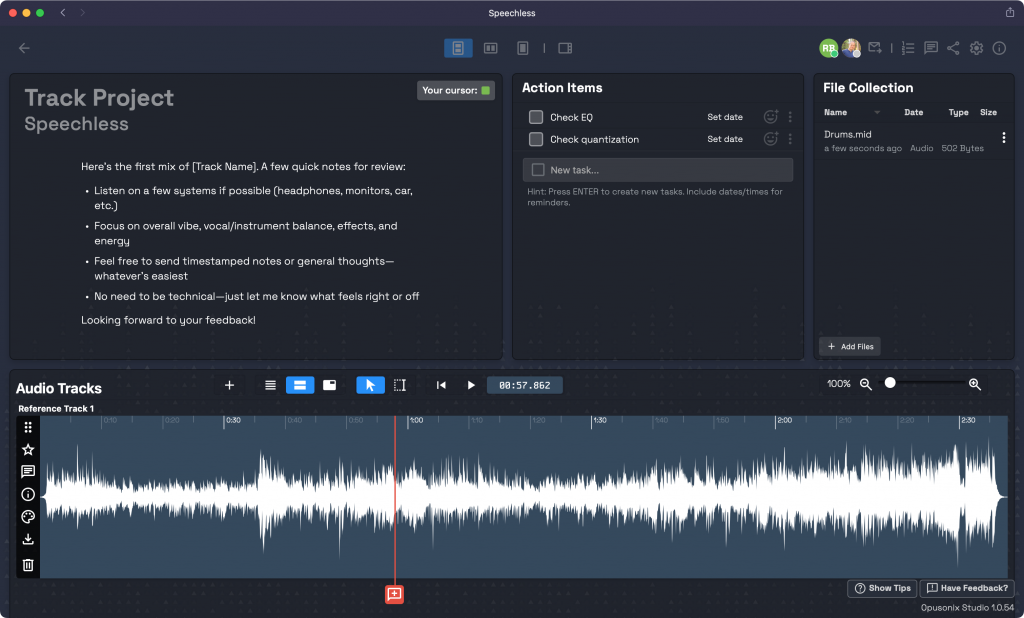
Every Opusonix project gives the full team one shared environment. Inside it, four core components sit together:
- Notes — a conversational, threaded notes section where the team can discuss the project as it evolves
- To-Do List — a lightweight task tracker scoped to the project
- Files Pod — centralized storage for all assets, stems, references, and deliverables
- Media Tracks Pod — the audio-native heart of the platform, where all audio and video tracks are visualized and hosted
This matters because scattered feedback across emails, DMs, and separate project management apps creates real problems on long-running projects. In Opusonix, everything lives in one place, in context.
Audio-Native Feedback
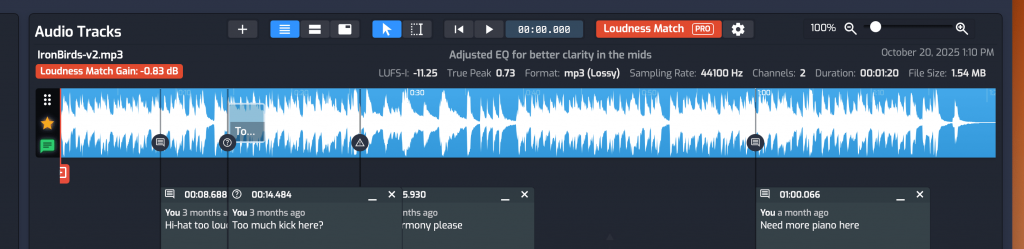
The Media Tracks Pod is where Opusonix separates itself most clearly from general tools. Producers and engineers can leave timestamped comments directly on a track’s waveform—no more writing “around 2:30 the snare feels too hot” and hoping the engineer finds the right moment. Comments are pinned to exact points in the audio.
Beyond comments, collaborators can start on-track discussions tied to specific moments, keeping feedback organized without losing the conversational thread.
Seamless A/B Testing With Loudness Matching
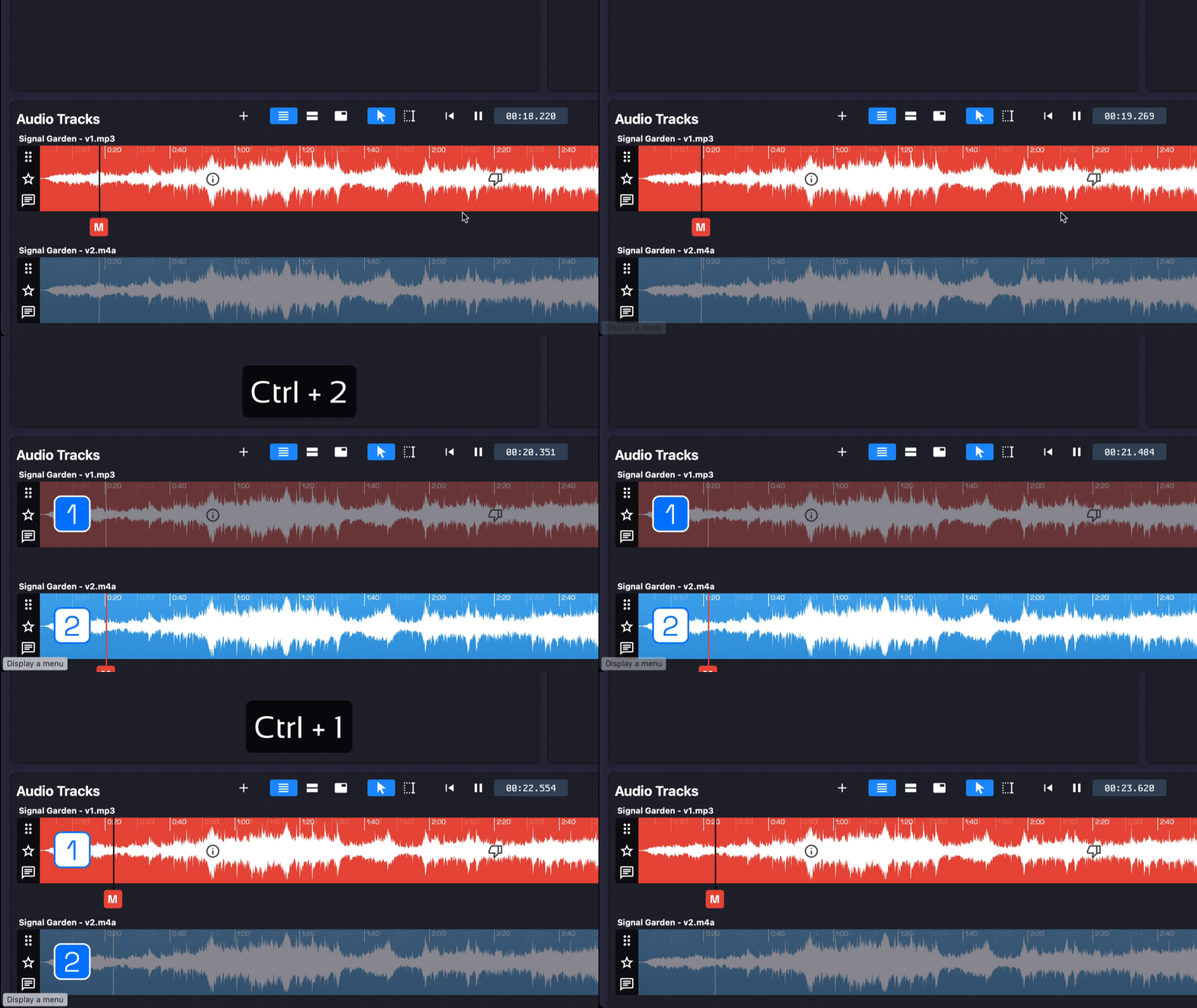
One of the most practical features for mixing and mastering workflows is built-in A/B testing. Opusonix lets you compare versions side-by-side during playback, with automatic loudness matching so louder versions don’t unfairly win the comparison. All comments stay visible across versions, giving the full context of how decisions evolved without needing to reconstruct a paper trail.
Role-Based Feedback Filtering
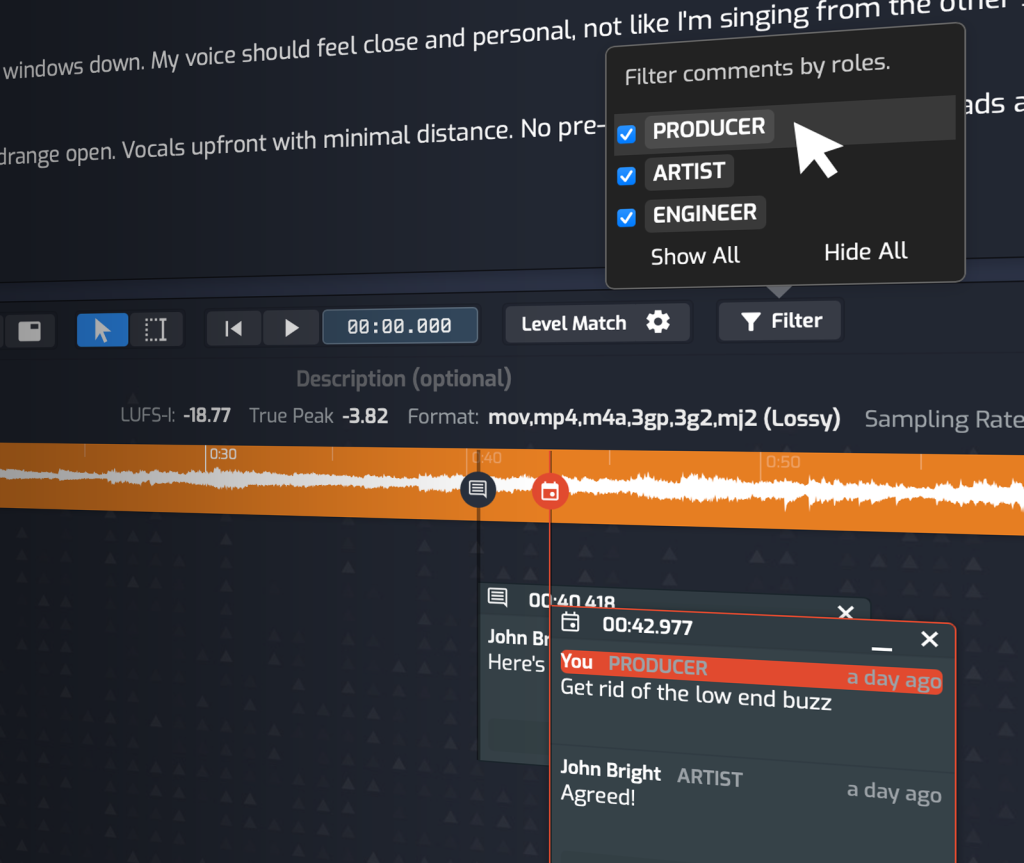
Larger projects involve multiple stakeholders with different perspectives and priorities. Opusonix lets you filter all feedback by role—view only the artist’s notes, or surface only the engineer’s comments, or see everything together. This is particularly useful when preparing for a mix review session versus an artist approval session. Each collaborator sees what’s relevant to them without losing access to the full picture.
Project Management That Understands Production
Beyond the audio tools, Opusonix includes project management features that map naturally to how production projects actually run:
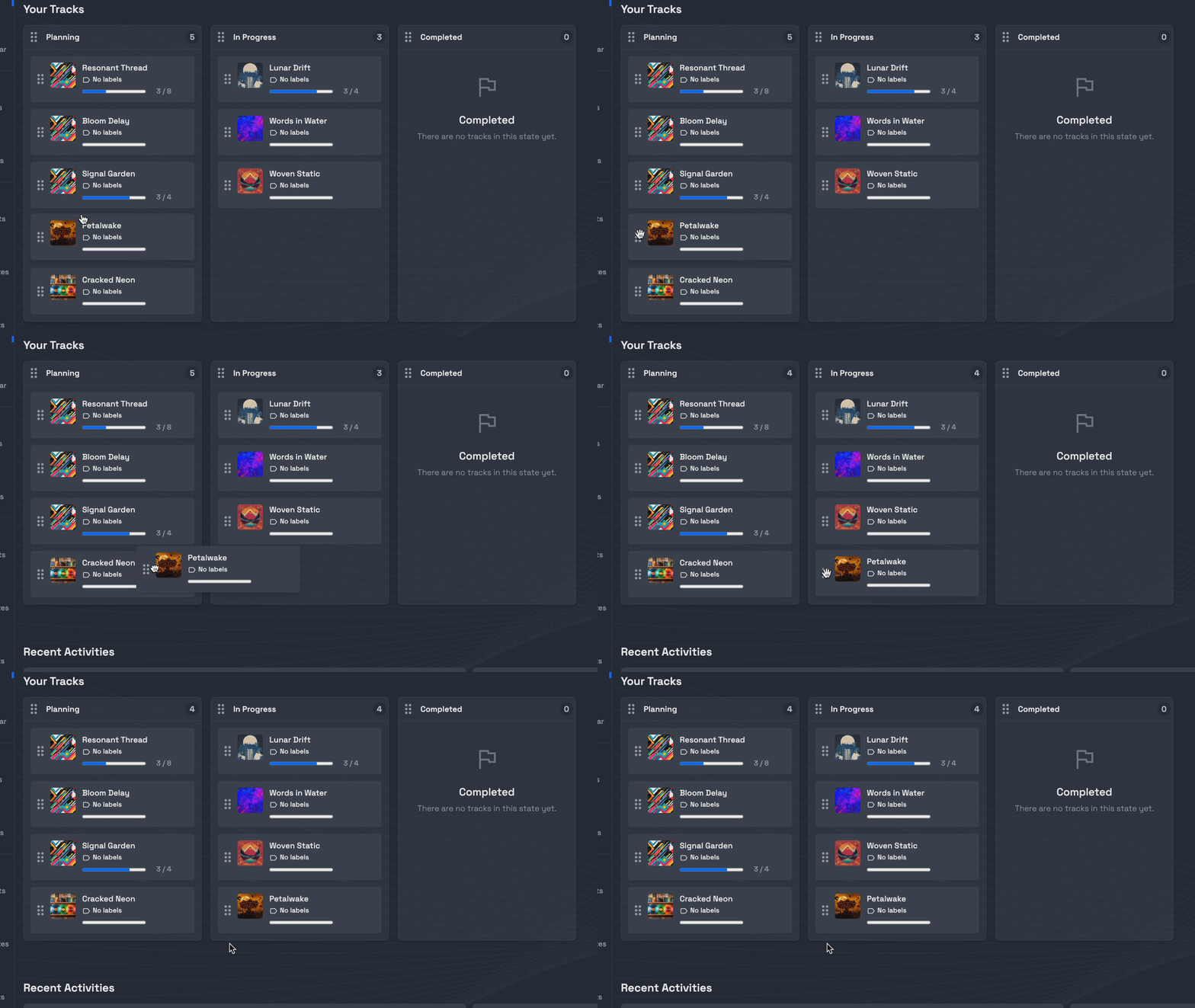
- Kanban boards for visualizing project status across stages
- Per-project task lists for tracking specific action items within a session or revision cycle
- A unified calendar across projects so engineers and producers managing multiple sessions can see their full schedule in one view
- Shareable review pages that let you send mobile-optimized playlists to clients and collaborators with no app required on their end
The result is a tool where the feedback, the files, the tasks, and the communication all live together—tied directly to the audio they’re about.
Asana: Purpose-Built for Project Management
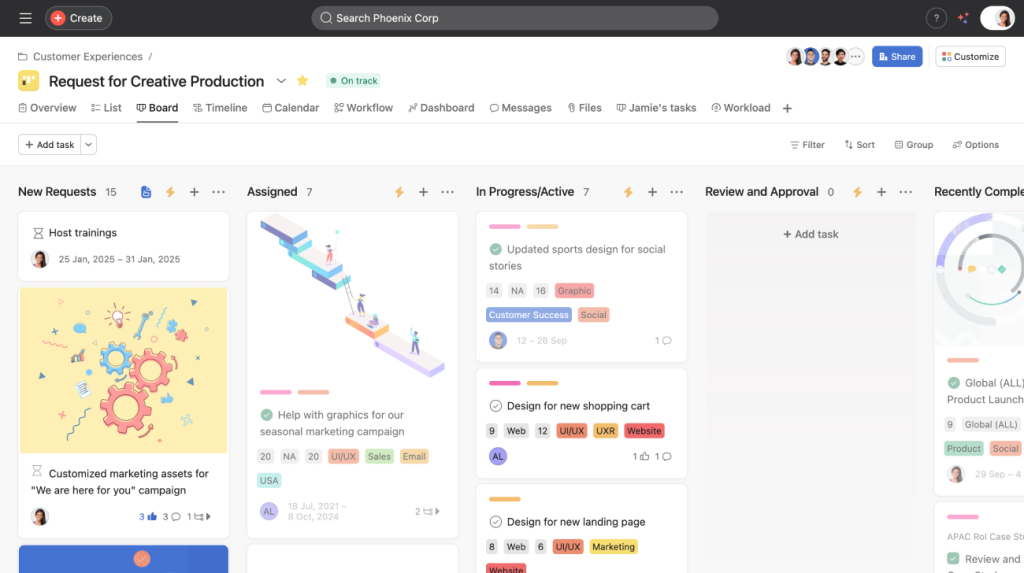
Asana is a mature, well-designed project management platform. For teams running complex workflows with dependencies, deadlines, and multiple stakeholders, it does a lot right.
Where it works for producers: Asana is useful for high-level project tracking—managing an album rollout, coordinating between a production team and a label, or tracking deliverable deadlines across multiple artists. Its timeline and dependency views are genuinely powerful, and it integrates with tools like Slack, Google Drive, and Dropbox.
Where it falls short: Asana wasn’t designed with audio workflows in mind, which is a natural limitation given its broader scope. There’s no waveform view, timestamped track commenting, or version comparison — so any audio-specific feedback has to happen in a separate tool. On long-running projects, that separation tends to fragment context, with comments referencing moments in a mix that have no direct link to the audio itself.
Notion: A Flexible Knowledge Hub
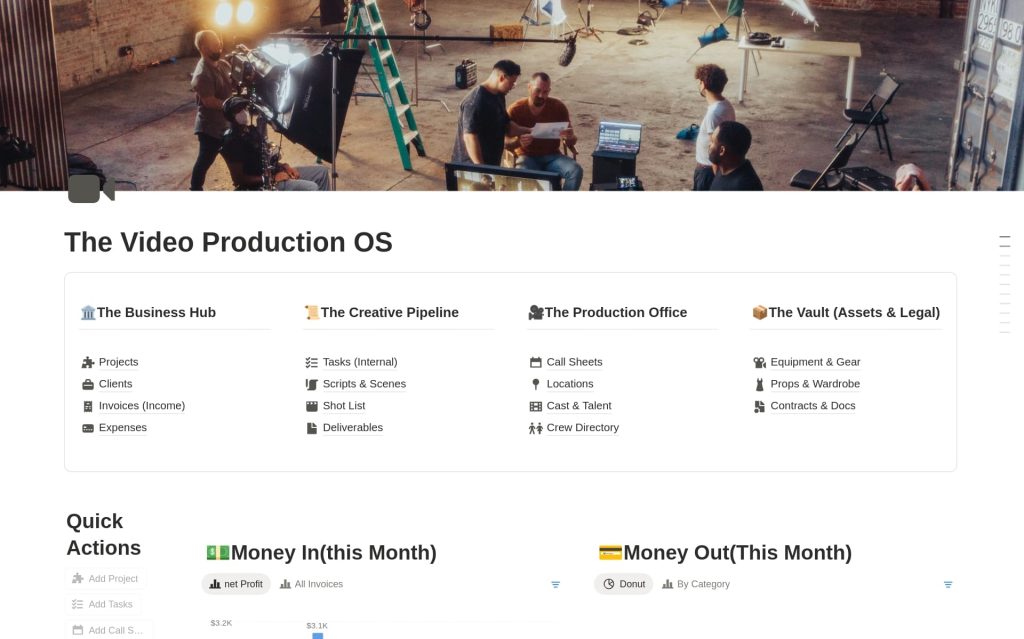
Notion has become popular among producers for its flexibility. It’s easy to build custom templates—a songwriting database, a mixing checklist, a gear inventory—and many teams use it as a catch-all knowledge base.
Where it works for producers: Notion excels at documentation and structured note-taking. Production teams use it for session notes, client briefs, reference playlists (via embeds), and internal wikis. It’s also useful for managing creative direction and storing reference materials alongside a project.
Where it falls short: Notion’s flexibility is also its constraint for production workflows — it’s a blank canvas, not an opinionated workspace. Audio files can be attached or embedded, but there’s no waveform playback, timestamped feedback, or structured review workflow built in. Teams that need to coordinate on a mix revision cycle will typically find themselves reaching for a separate tool, with feedback and project context living in different places as a result.
Summary: Choosing the Right Tool
Comparison of Opusonix, Asana, and Notion for music producers
| Feature | Opusonix | Asana | Notion |
|---|---|---|---|
| Audio playback & waveform view | Excellent | No | No |
| Timestamped track comments | Excellent | No | No |
| A/B version testing with loudness matching | Excellent | No | No |
| Role-based feedback filtering | Excellent | No | No |
| Task management | Good | Excellent | Good |
| Calendar / timeline view | Good | Excellent | Good |
| Documentation & knowledge base | No | No | Excellent |
| Shareable client review pages | Excellent | No | No |
Asana and Notion are strong tools for what they were designed to do. For producers looking to manage high-level schedules or maintain a project knowledge base, they’re reasonable choices—often used alongside audio-specific tools.
But if the goal is a single workspace where the entire production team can coordinate around the audio itself—with feedback, tasks, files, and communication all in one place and tied to specific moments in a track — Opusonix is the only platform in this comparison built to do that.