

Plan Albums Better with Opusonix: A Walkthrough of the Album Planner
Putting an album together can quickly become messy—multiple mix versions, endless playlists, and long email threads with collaborators and clients.
To make this process easier, Opusonix includes an Album Planner designed specifically for producers and audio engineers. In the video above, we walk through how the Album Planner helps teams collaborate on audio projects, stay organized, and make better album-level decisions.
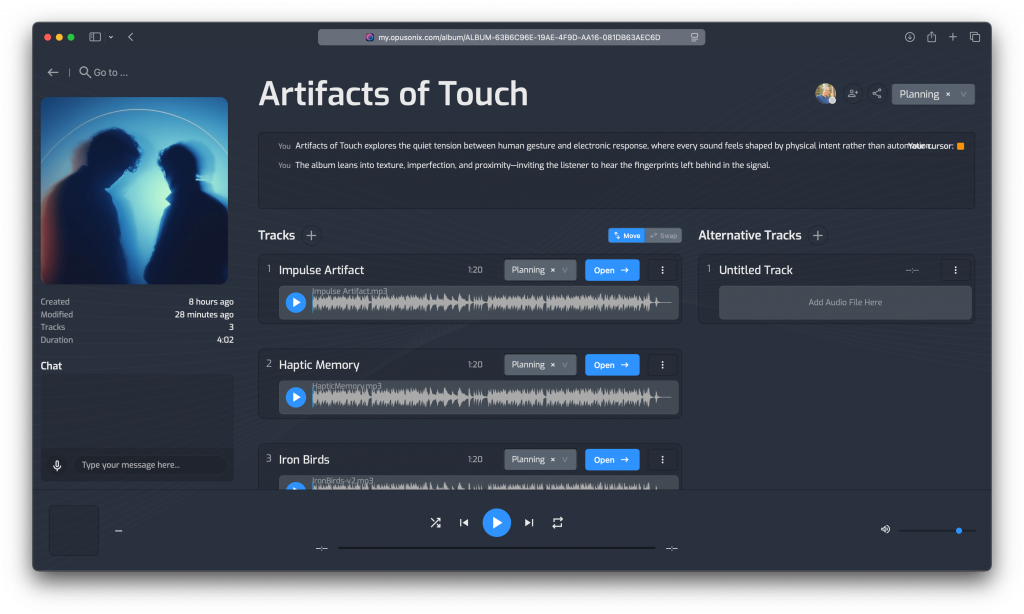
What the Album Planner Does
The Album Planner gives you an album-wide view of your project in one place. Instead of juggling files and messages across different tools, everything related to the album lives together.
With Opusonix, producers can:
Organize tracks and test different album sequences
Listen to mix revisions in the context of the full album
Keep feedback tied directly to each track
Share the album with clients and external listeners easily
This makes Opusonix a powerful piece of album planning software for both early production and final mixing stages.
Managing Tracks and Mix Revisions
Each track in the Album Planner can hold multiple mix revisions. New mixes are added with simple drag and drop, and older versions stay grouped under the same track.
This makes it easy to manage mix revisions with clients and collaborators. You can switch between versions instantly while listening through the album, helping everyone hear which mix works best in context—without exporting multiple playlists or files.
Collaboration Without the Email Chaos
Every track in the album has its own workspace for notes and discussion. Feedback stays attached to the audio, instead of getting lost in email threads or chat apps.
At the album level, Opusonix also provides shared notes and persistent chat, making it easier for teams to collaborate on audio projects in real time while staying aligned.
Testing and Sharing the Album
The built-in player lets you listen to the album from start to finish like a music player. This is ideal for checking pacing, transitions, and overall flow.
When it’s time to get outside feedback, producers can generate a shareable album playlist. The playlist works in a web browser and doesn’t require a login, making it client-friendly and easy to use.
Watch the Full Tutorial
The video above shows the full Album Planner workflow in action—from setting up an album to sharing it for feedback.
If you’re looking for a better way to organize albums, reduce decision fatigue, and keep collaboration focused on the music, the Opusonix Album Planner is built for exactly that.