
Mix Project Workflow (Part 1): How to Start a Mix Project — Files, Logistics, and Client Collaboration
This article is part of the Mix Project Workflow series, where we explore practical ways audio engineers streamline real-world mixing projects using modern tools like Opusonix.
Table of Contents
Starting a new mix project—whether it’s for your own work or for a client—sets the practical foundation for everything that follows. Most engineers can absolutely handle mix projects, but as revisions accumulate and more people get involved, things can gradually become messy: files spread across folders, feedback scattered across emails, and decisions buried in message threads.
Taking a little time to organize the project at the beginning makes the rest of the process smoother, more efficient, and easier to manage—especially once mixes start moving quickly.
This article focuses on the logistics side of starting a mix project: files, communication, and collaboration.
Common Setup Challenges at the Start of a Mix Project
File storage and access
Every mix project starts with files—sometimes a lot of them. At a minimum, you need a storage setup that is:
Large enough for multitrack audio and mix revisions
Easy to upload to and download from
Accessible to collaborators and clients when needed
Most engineers rely on cloud storage services like Google Drive or Dropbox. These solutions are reliable and scalable, but as a project progresses, they tend to introduce friction:
Folder structures grow complex as revisions multiply
File names become harder to track
Links need to be emailed repeatedly
Context around why a file exists gets lost
The storage itself works—but managing it alongside the rest of the project becomes an ongoing task.
Keeping discussions and notes in sync
Beyond files, every mix project involves discussion:
Creative direction
Revision priorities
Client preferences
Decisions that affect future versions
Tools like Google Docs or shared notes are often used to track this information. They’re helpful, but they live separately from the audio itself. Over time, it can become unclear which comments relate to which mix, or whether a decision still applies to the latest version.
Feedback on mixes
Feedback is where organization really starts to matter.
Email and text messages are still the most common ways clients respond to mixes, but they introduce several challenges:
Describing musical details precisely is difficult for many clients
Writing timestamps manually adds friction
Feedback often arrives fragmented across multiple messages
Responses become nested, forwarded, or partially missed
None of this is unusual—it’s just the natural result of using tools that weren’t designed for audio-specific collaboration.
Too many tools, too much overhead
Individually, each tool does its job reasonably well. But when storage, notes, feedback, and files all live in different places, the mental overhead adds up. Keeping everything aligned becomes a background task that quietly consumes time and attention.
This is where having a centralized workspace makes a meaningful difference.
How Opusonix Streamlines the Start of a Mix Project
Opusonix is designed to bring the early stages of a mix project into a single, organized workspace—without changing how you actually mix.
Here’s how a typical setup looks.
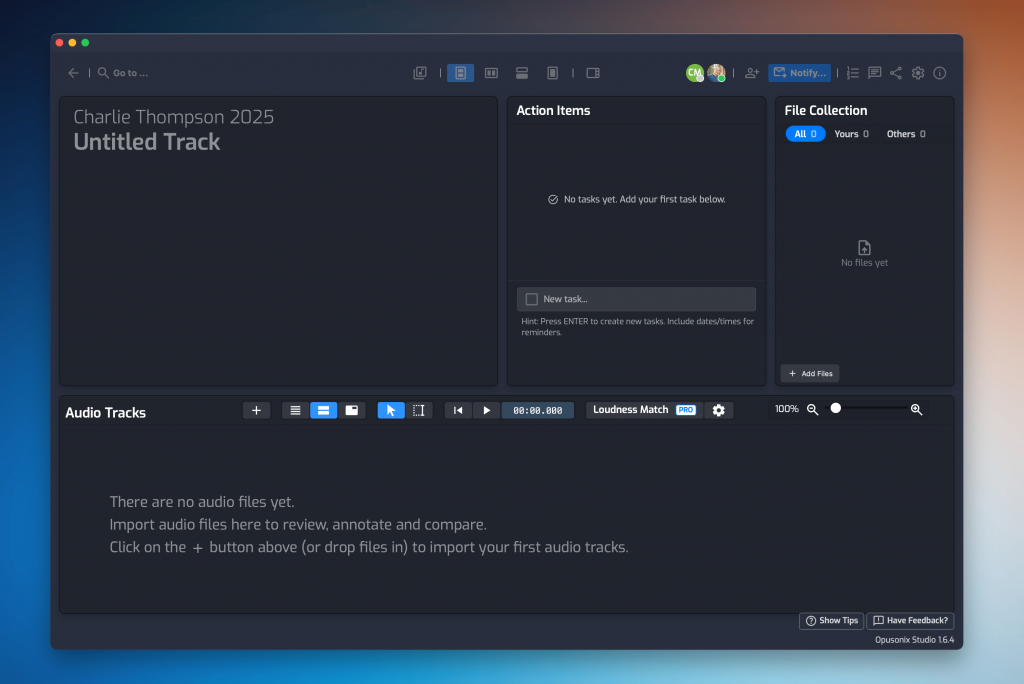
1. Create a Track Project as your workspace
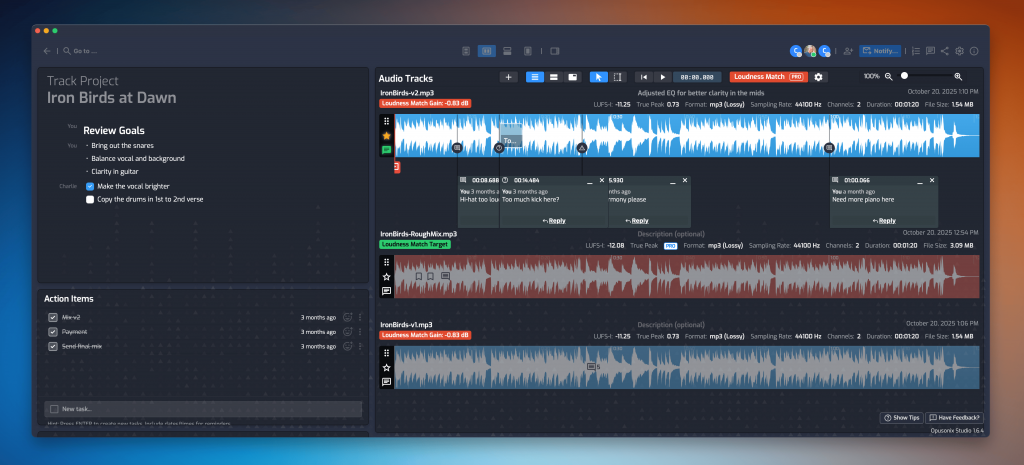
A Track Project in Opusonix acts as the home base for a mix. Instead of assembling folders, documents, and email threads, you start with a single workspace where everything related to the track will live.
This becomes the reference point for everything about this track: the files, the notes, the mixes and the feedback.
2. Invite clients and collaborators
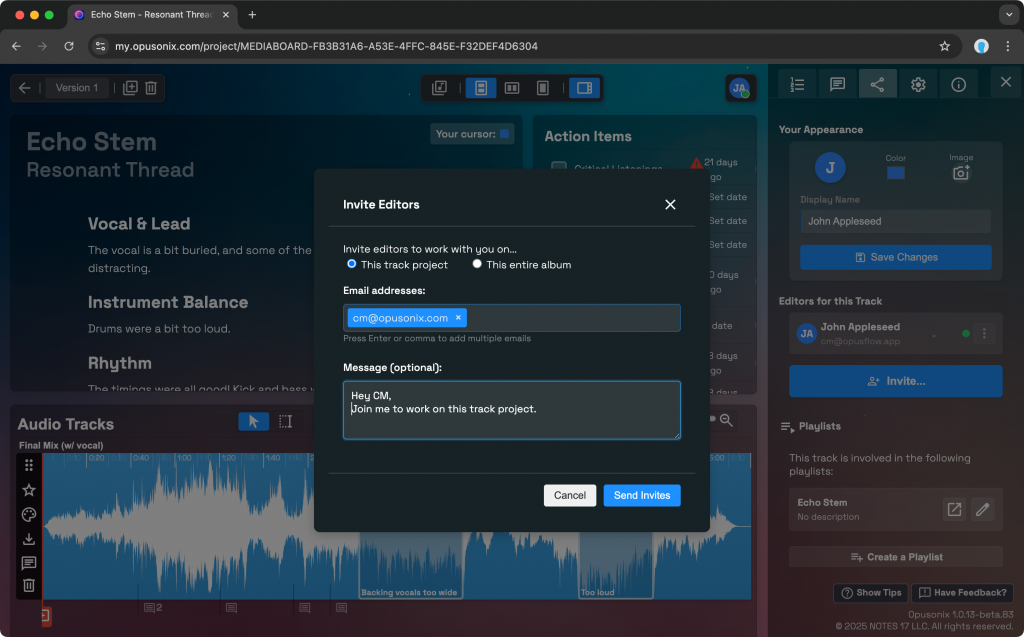
Adding collaborators or clients is straightforward—just enter their email addresses. There’s no complicated onboarding or setup process. Everyone you invite has access to the same project workspace, which immediately reduces confusion about where things live.
3. Exchange files using the Files Pod
The Files Pod is where all non-mix files live:
Multitracks
Stems
Reference tracks
Documentation or scores
Anyone involved in the project can upload and download files from this shared space. Instead of sending links back and forth or wondering whether you’re looking at the latest upload, there’s a single, consistent location for file exchange.
Does Opusonix offer sufficient storage for your projects? Here’s what you need to know: Opusonix Pro has a data capacity of 200GB, with an individual file size cap of 5GB.
4. Keep high-level discussion in the Notes Pod
For project-wide discussion, Opusonix provides the Notes Pod—a collaborative, conversational notes area.
It functions similarly to a shared document, but with a few important advantages:
It tracks who said what
It preserves discussion as an ongoing conversation
It stays attached to the project itself
Over time, this becomes the living record of creative direction, decisions, and expectations for the track.

5. Upload mixes and collect feedback in the Audio Tracks Pod
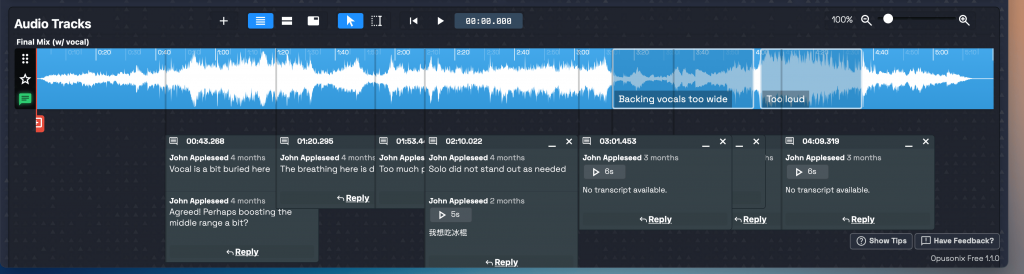
When it’s time to share mixes, you simply upload them to the Audio Tracks Pod.
From there:
Clients and collaborators can listen directly in the browser
Feedback is left as timestamped comments on the audio itself
Comments stay attached to the specific mix version
This removes the need for emails, manual timestamps, or guessing what someone was referring to. Feedback becomes clearer, more actionable, and easier to respond to.
If needed, Opusonix also allows you to control whether mixes can be downloaded. For example, you can disable downloads until a certain stage of the project via the project’s settings.
6. One workspace, one link
Perhaps the biggest benefit of starting a project this way is simplicity. Files, notes, mixes, and feedback all live in the same workspace, accessible through a single link.
For everyone involved, there’s no question about:
Where to upload files
Where to leave feedback
Which version is being discussed
Wrapping Up
Starting a mix project with a clear, centralized setup doesn’t change how you mix—but it does change how smoothly the project runs. By keeping files, discussion, and feedback in one place, you reduce friction and free up more attention for the creative work itself.
This article focused on getting a project off to a clean start. In the rest of this series, we’ll look at how to manage mix revisions, compare versions, stay organized across multiple projects, and deliver final mixes efficiently.
Your mix project journey has just begun.